
Markdown, ready to deliver
as PDF and Word
Book-quality typesetting with flawless Chinese text. Markdown, Word and PDF convert both ways, with tables, equations and references out of the box.
- Free, no account
- Files deleted after 2 hours
- PDF and editable Word
- 6 languages
Drop files or a folder
.md · .docx · .tex · .pdf · .zip — include images and refs.bib
The PDF is re-typeset in the style you choose — headings, lists, tables, pictures and text colors are kept.
If ticked, this PDF is sent to SoMark's free recognition service (free-oxr.somark.ai); this usually takes 30–90 seconds. Unticked, it stays on this site. Privacy
Public repositories. Paste the address of a .md file, a folder or a repository (its README is used). Pictures the file uses are fetched too.
Optional. Follows its page setup, fonts and styles, its headers and footers as in Word (odd / even and first pages, tables, logos, watermark) and page numbers. A cover or letterhead in it is used too: mark the values with {{title}}, {{date}}… and the place of your text with {{body}}.
More options
Done
The conversion didn't finish
Write Markdown. Get documents that look professionally typeset.
Every page below was typeset by this converter straight from the source beside it — systems of equations, matrices, multi-level merged headers, dashboards, theorem boxes, citations. Nothing retouched.
---
title: Q3 2026 Business Review
subtitle: Northwind Technologies · Board quarterly report
author: Business Operations · Finance
date: October 15, 2026
number-sections: true
---
# Key figures {#sec:kpi}
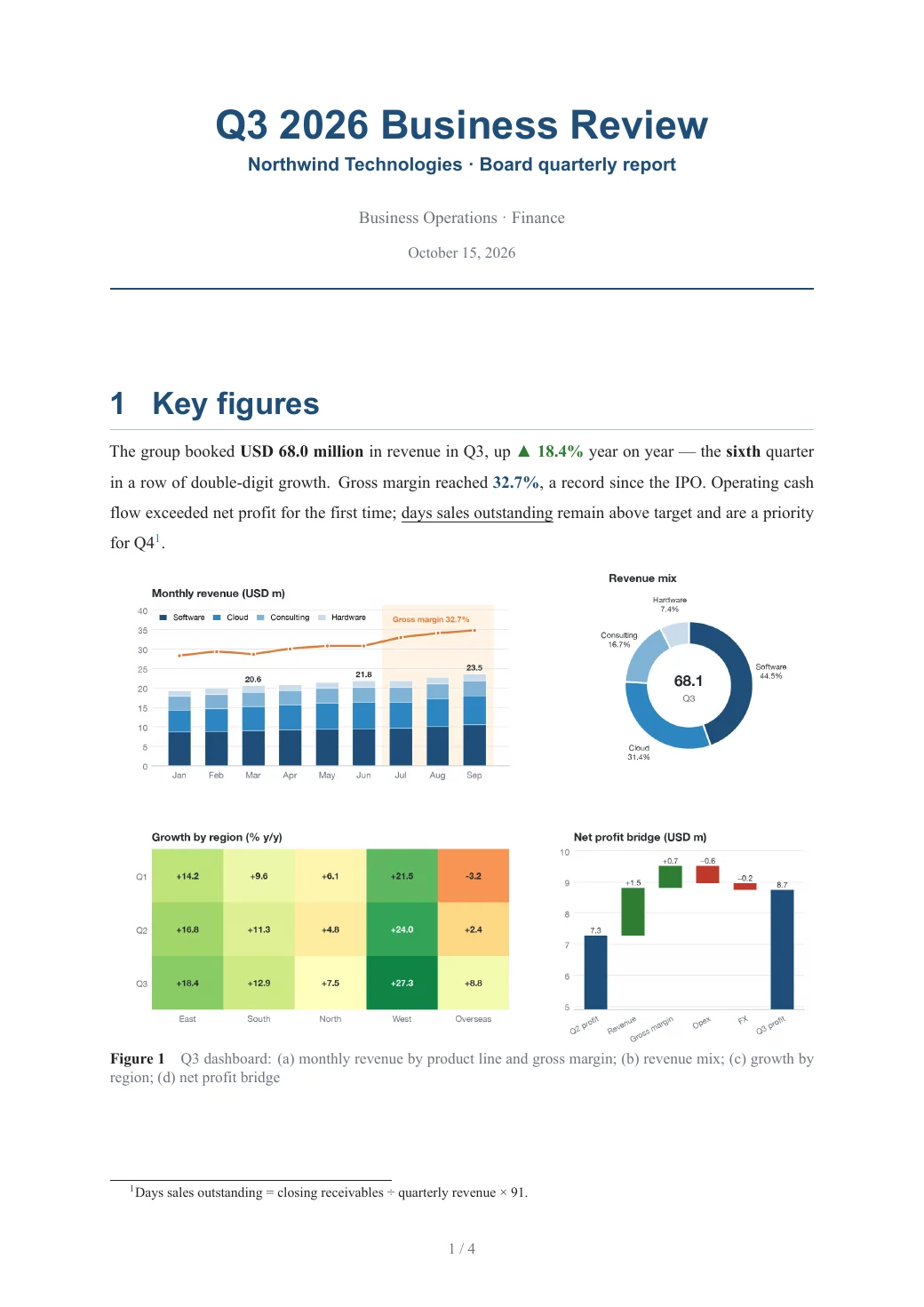
The group booked **USD 68.0 million** in revenue in Q3, up [▲ 18.4%]{color=green .bold} year on year — the **sixth** quarter in a row of double-digit growth. Gross margin reached [32.7%]{color=primary .bold}, a record since the IPO. Operating cash flow exceeded net profit for the first time; [days sales outstanding]{.underline} remain above target and are a priority for Q4[^1].
{#fig:dash width=100%}
<table>
<caption>Key figures against budget, Q3 2026 {#tbl:kpi}</caption>
<tr><th rowspan="2">Area</th><th rowspan="2">Measure</th><th colspan="3" align="center">Q3 2026</th><th rowspan="2">y/y</th><th rowspan="2">Status</th></tr>
<tr><th>Actual</th><th>Budget</th><th>vs budget</th></tr>
<tr><td rowspan="2"><b>Scale</b></td><td>Revenue (USD m)</td><td align="right"><b>68.0</b></td><td align="right">64.4</td><td align="right">105.7%</td><td align="right"><span style="color:#2E7D32">+18.4%</span></td><td><span style="color:#2E7D32">● Ahead</span></td></tr>
<tr><td>New contracts (USD m)</td><td align="right"><b>85.7</b></td><td align="right">77.0</td><td align="right">111.3%</td><td align="right"><span style="color:#2E7D32">+26.1%</span></td><td><span style="color:#2E7D32">● Ahead</span></td></tr>
<tr><td rowspan="2"><b>Profit</b></td><td>Gross margin</td><td align="right"><b>32.7%</b></td><td align="right">31.5%</td><td align="right">+1.2 pt</td><td align="right"><span style="color:#2E7D32">+1.9 pt</span></td><td><span style="color:#2E7D32">● Ahead</span></td></tr>
<tr><td>Net profit (USD m)</td><td align="right"><b>8.7</b></td><td align="right">8.4</td><td align="right">103.3%</td><td align="right"><span style="color:#2E7D32">+21.6%</span></td><td><span style="color:#2E7D32">● On track</span></td></tr>
<tr><td rowspan="2"><b>Cash</b></td><td>Operating cash flow (USD m)</td><td align="right"><b>9.9</b></td><td align="right">7.7</td><td align="right">129.1%</td><td align="right"><span style="color:#2E7D32">+48.0%</span></td><td><span style="color:#2E7D32">● Ahead</span></td></tr>
<tr><td>Days sales outstanding</td><td align="right"><b>96</b></td><td align="right">85</td><td align="right">−11 days</td><td align="right"><span style="color:#C0392B">+7 days</span></td><td><span style="color:#E67E22">▲ Watch</span></td></tr>
</table>
> [!IMPORTANT]
> Cloud now makes up **31.4%** of revenue ([@fig:dash]b) and has become our second growth engine; the West has led regional growth for three quarters running.
# Regions {#sec:region}
<table>
<caption>Revenue by region and product line (USD m) {#tbl:region}</caption>
<tr><th rowspan="2">Region</th><th rowspan="2">Market</th><th colspan="2" align="center">Software</th><th colspan="2" align="center">Cloud</th><th rowspan="2">Total</th></tr>
<tr><th>Q3</th><th>y/y</th><th>Q3</th><th>y/y</th></tr>
<tr><td rowspan="3"><b>East</b></td><td>New York</td><td align="right">5.9</td><td align="right">+12%</td><td align="right">4.3</td><td align="right"><span style="color:#2E7D32">+41%</span></td><td align="right">12.0</td></tr>
<tr><td>Boston</td><td align="right">5.3</td><td align="right">+19%</td><td align="right">3.4</td><td align="right"><span style="color:#2E7D32">+36%</span></td><td align="right">9.9</td></tr>
<tr><td>Philadelphia</td><td align="right">4.6</td><td align="right">+15%</td><td align="right">2.8</td><td align="right">+28%</td><td align="right">8.4</td></tr>
<tr><td rowspan="2"><b>South</b></td><td>Atlanta</td><td align="right">5.0</td><td align="right">+9%</td><td align="right">3.1</td><td align="right">+24%</td><td align="right">9.2</td></tr>
<tr><td>Miami</td><td align="right">2.0</td><td align="right">+6%</td><td align="right">1.0</td><td align="right">+18%</td><td align="right">3.4</td></tr>
…
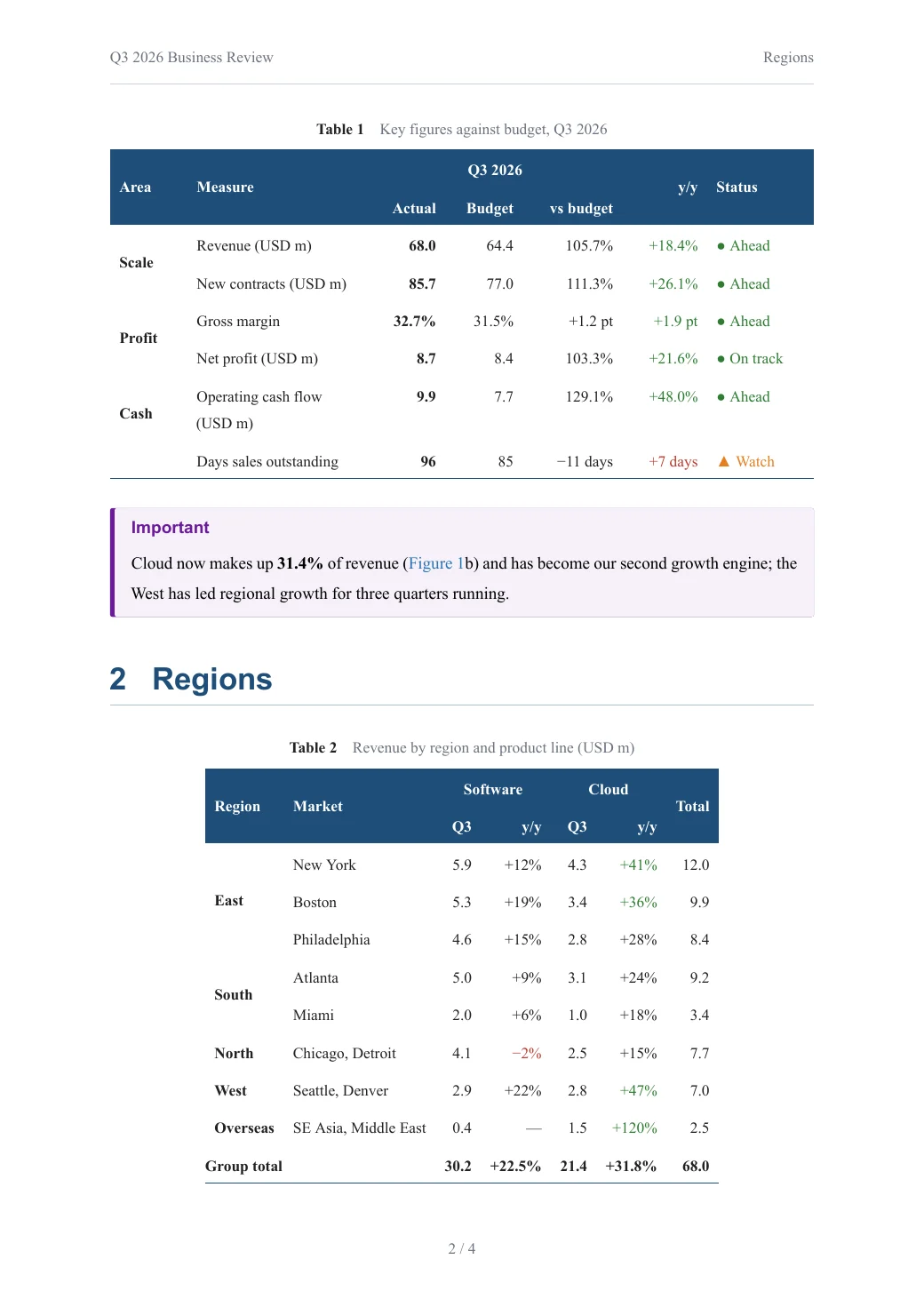
A four-panel dashboard, a KPI table with two-level headers, merged-cell regional breakdown, a DuPont formula, a colour-coded risk matrix and a task list — all in plain Markdown.
Open this PDF ↗Also delivered as an editable Word file
---
title: Attention-Weighted Physics-Informed Neural Networks for the Unsteady Navier–Stokes Equations
author: Ming Wang^1^, Hua Li^1,2^, Siyuan Chen^2^
date: September 2026
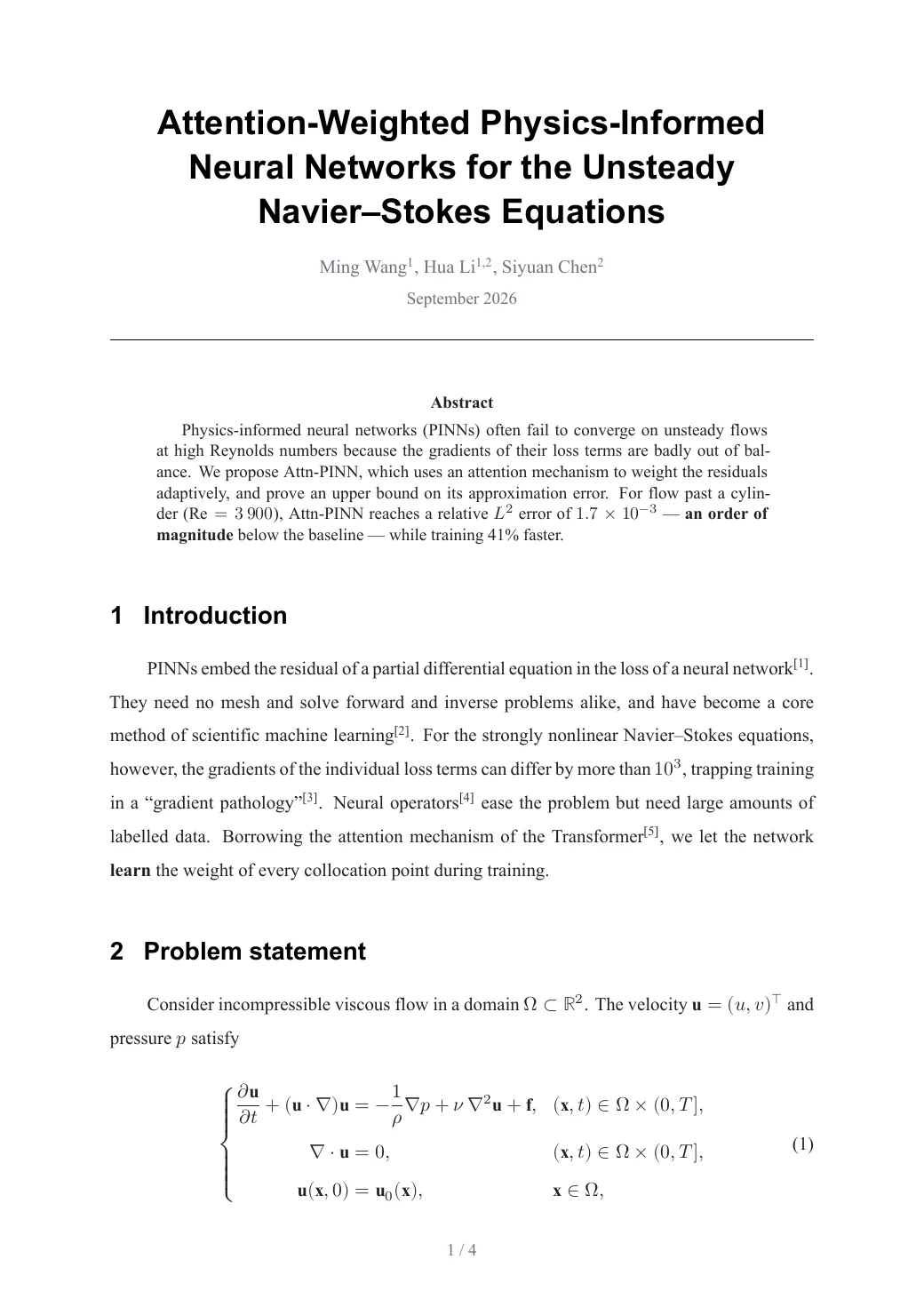
abstract: Physics-informed neural networks (PINNs) often fail to converge on unsteady flows at high Reynolds numbers because the gradients of their loss terms are badly out of balance. We propose Attn-PINN, which uses an attention mechanism to weight the residuals adaptively, and prove an upper bound on its approximation error. For flow past a cylinder ($\mathrm{Re}=3\,900$), Attn-PINN reaches a relative $L^2$ error of $1.7\times10^{-3}$ — **an order of magnitude** below the baseline — while training 41% faster.
bibliography: refs.bib
number-sections: true
header-left: Attn-PINN for the Unsteady Navier–Stokes Equations
---

# Introduction

PINNs embed the residual of a partial differential equation in the loss of a neural network [@raissi2019]. They need no mesh and solve forward and inverse problems alike, and have become a core method of scientific machine learning [@karniadakis2021]. For the strongly nonlinear Navier–Stokes equations, however, the gradients of the individual loss terms can differ by more than $10^{3}$, trapping training in a “gradient pathology” [@wang2021]. Neural operators [@li2021] ease the problem but need large amounts of labelled data. Borrowing the attention mechanism of the Transformer [@vaswani2017], we let the network **learn** the weight of every collocation point during training.

# Problem statement {#sec:problem}

Consider incompressible viscous flow in a domain $\Omega\subset\mathbb{R}^2$. The velocity $\mathbf{u}=(u,v)^{\top}$ and pressure $p$ satisfy

$$
\left\{
\begin{aligned}
\frac{\partial \mathbf{u}}{\partial t} + (\mathbf{u}\cdot\nabla)\mathbf{u}
  &= -\frac{1}{\rho}\nabla p + \nu\,\nabla^{2}\mathbf{u} + \mathbf{f},
  && (\mathbf{x},t)\in\Omega\times(0,T],\\
\nabla\cdot\mathbf{u} &= 0,
  && (\mathbf{x},t)\in\Omega\times(0,T],\\
\mathbf{u}(\mathbf{x},0) &= \mathbf{u}_0(\mathbf{x}),
  && \mathbf{x}\in\Omega,
\end{aligned}
\right.
$$ {#eq:ns}

where $\nu$ is the kinematic viscosity. With networks $\hat{\mathbf{u}}_{\theta}$ and $\hat{p}_{\theta}$ approximating the solution, the momentum residual is
$\mathbf{r}_{\theta} = \partial_t\hat{\mathbf{u}}_{\theta} + (\hat{\mathbf{u}}_{\theta}\cdot\nabla)\hat{\mathbf{u}}_{\theta} + \rho^{-1}\nabla\hat{p}_{\theta} - \nu\nabla^{2}\hat{\mathbf{u}}_{\theta} - \mathbf{f}$.

# Method {#sec:method}

## Attention-weighted residuals

For $N_r$ collocation points $\{\mathbf{x}_i\}$, the weights come from scaled dot-product attention over residual features:
…
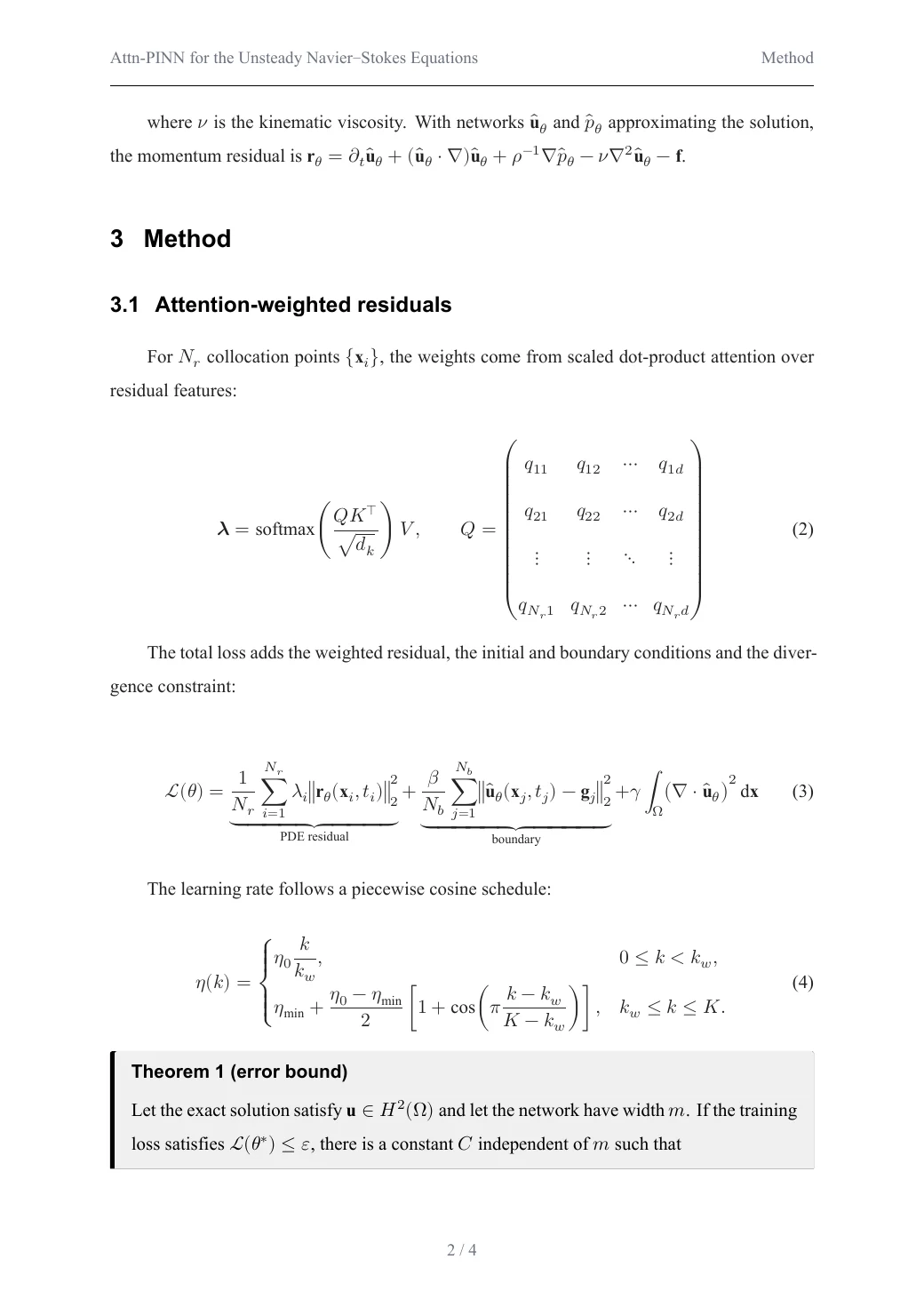
The Navier–Stokes system, matrices, piecewise functions, an annotated loss with underbraces, a theorem box, subfigures and a .bib bibliography — numbered and cross-referenced automatically.
Open this PDF ↗Also delivered as an editable Word file
---
title: 关于做好2026年度安全生产工作的通知
gongwen:
  份号: "000123"
  密级: 机密★1年
  紧急程度: 特急
  发文机关标志: 星河市人民政府文件
  发文字号: 星政发〔2026〕12号
  主送机关: 各区县人民政府,市政府各部门,各有关单位:
  发文机关署名: 星河市人民政府
  成文日期: 2026-10-24
  附注: (此件公开发布)
  抄送: 市委各部门,市人大常委会办公室,市政协办公室,市中级人民法院,市人民检察院,各人民团体。
  印发机关: 星河市人民政府办公室
  印发日期: 2026-10-24
---

为深入贯彻落实安全生产工作部署,切实防范化解重大安全风险,坚决遏制重特大事故发生,保障人民群众生命财产安全,经市政府同意,现就做好本年度安全生产工作通知如下。

# 一、总体要求

坚持人民至上生命至上,统筹发展和安全,坚持安全第一预防为主综合治理方针,以防范化解重大安全风险为主线,以深化安全生产专项整治为抓手,全面提升本质安全水平,推动安全生产形势持续稳定向好,为全市经济社会高质量发展营造良好安全环境。

# 二、重点任务

## (一)压实安全生产责任

各地各部门要严格落实党政领导干部安全生产责任制,按照管行业必须管安全管业务必须管安全管生产经营必须管安全的要求,层层分解任务,逐级压实责任,确保责任落实到岗位到人员,形成横向到边纵向到底的责任体系。

## (二)深化专项整治行动

聚焦危险化学品矿山消防交通运输建筑施工城镇燃气等重点行业领域,全面开展隐患排查整治,建立问题隐患和制度措施两个清单,实行闭环管理,做到整改责任措施资金时限和预案五落实,坚决防止形式主义和官僚主义。

### 1. 危险化学品领域

全面摸排危险化学品生产储存使用经营运输废弃处置等环节风险底数,督促企业完善安全设施,严格落实特殊作业审批制度,严厉打击非法违法行为。

### 2. 城镇燃气领域

开展城镇燃气管道老化更新改造,2026年底前完成附件1所列重点任务。餐饮等人员密集场所全部安装可燃气体报警装置。
…
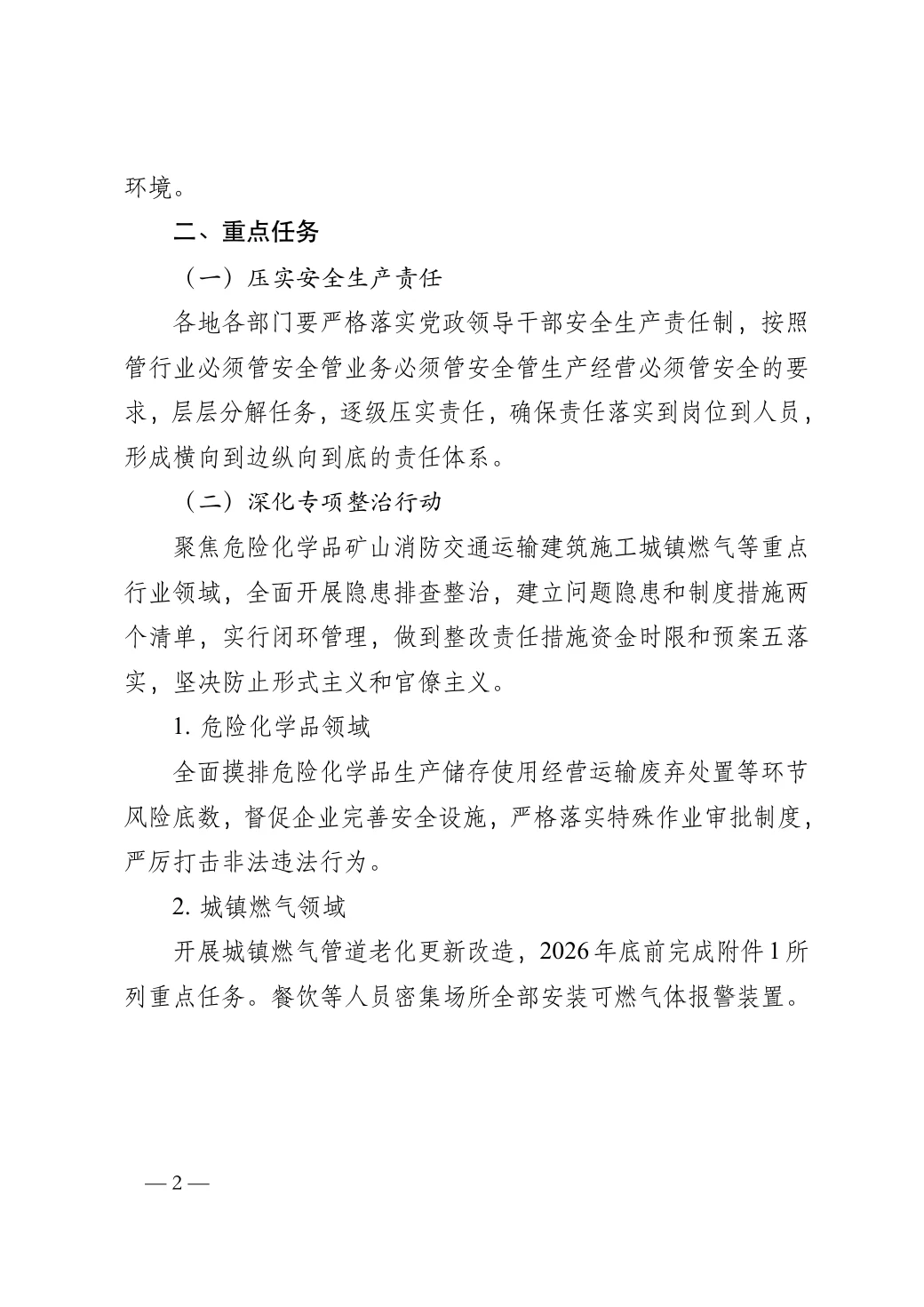
Chinese official document to GB/T 9704: red header, classification, document number, closing block, and attachments on their own pages — merged-cell tables included.
Open this PDF ↗Also delivered as an editable Word file
---
title: Northwind Smart Campus Feasibility Study
subtitle: Draft for review
date: 2026-10-20
client: City Renewal Authority
report-no: NW-2026-018
---

# Project overview

Northwind Smart Campus sits on 38.6 hectares in the east of the high-tech zone, with 520,000 m² of floor area for R&D offices, pilot plants, staff housing and services. Construction takes 36 months.

# Why build it

The campus is expected to create about 12,000 jobs and USD 1.2 billion of annual output, strengthening the region's innovation chain.

| Indicator              | Value          |
|------------------------|----------------|
| Total investment       | USD 600 m      |
| Financial IRR          | 9.6%           |
| Payback period         | 11.2 years     |

: Key economic indicators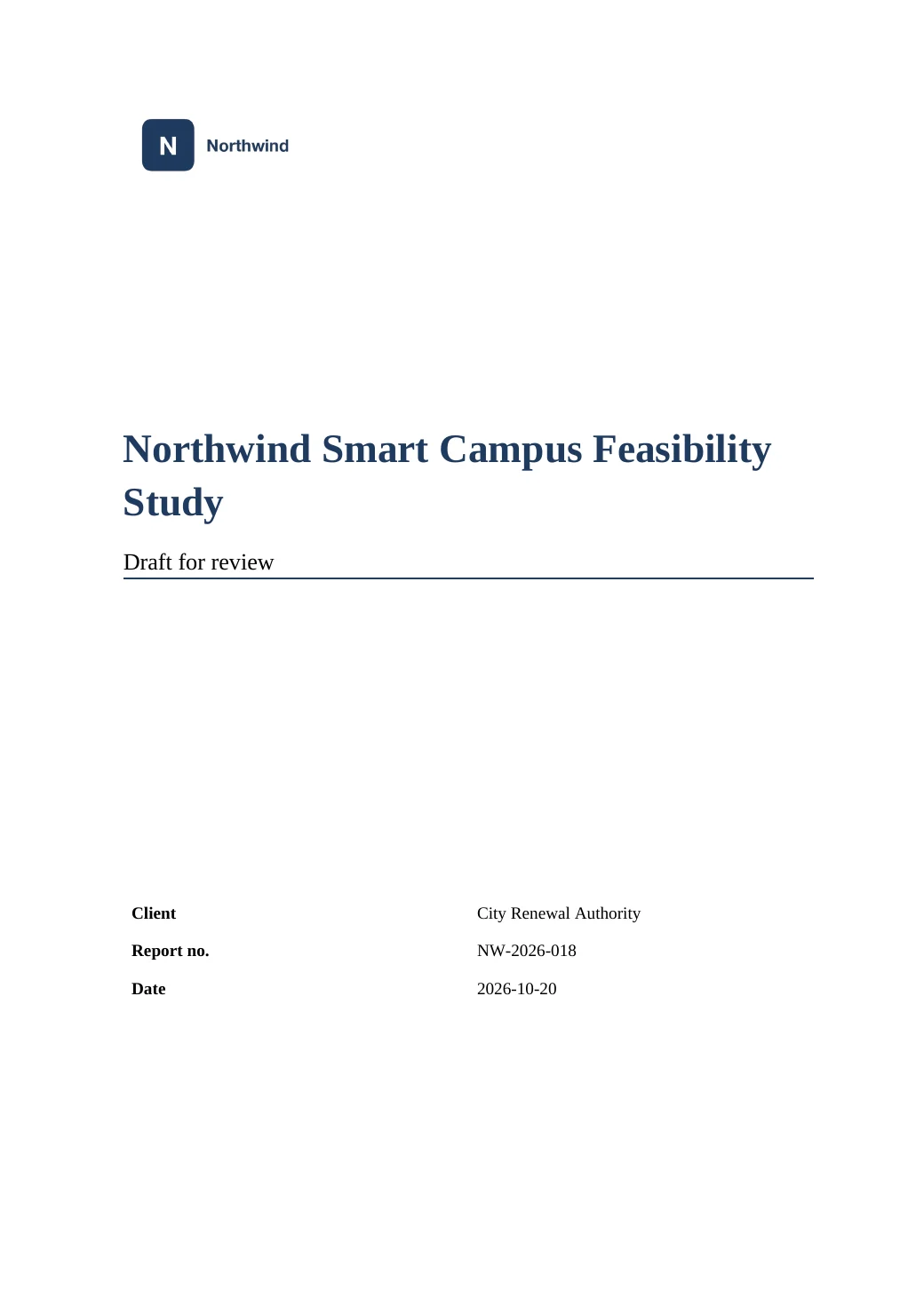
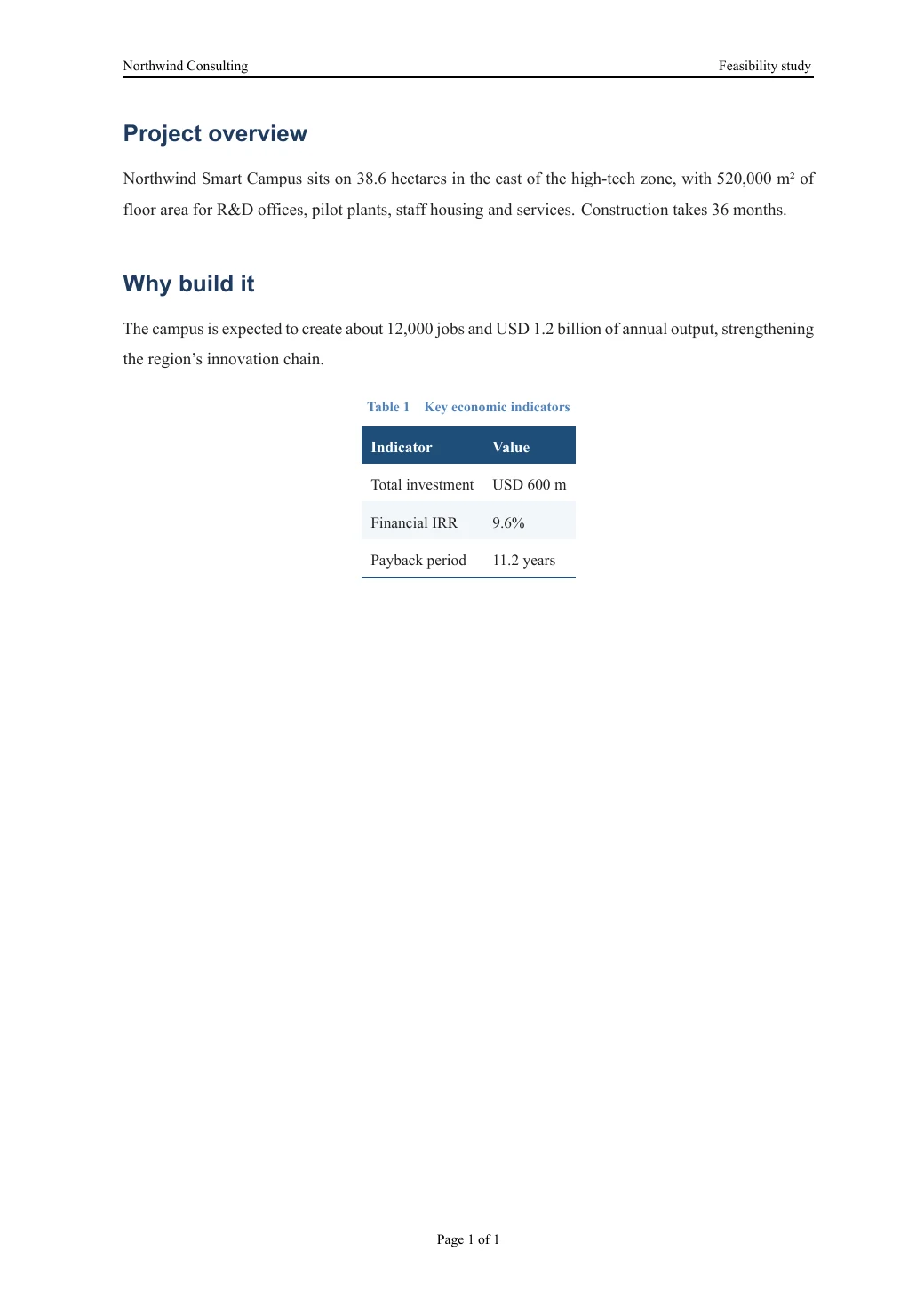
Your company template's cover, logo and header, with the values filled in from the document.
Open this PDF ↗Also delivered as an editable Word file
Browse all examples, with PDF, Word and source to download →
From file to finished document in seconds
Drop a folder, pick a style, download. Nothing to install.
Screen recording: a Markdown report and its chart are dropped onto the page, converted, and downloaded as PDF and Word.
A PDF you can deliver
Professionally typeset, fonts embedded — identical on every device.
Word you can keep editing
Heading styles, table of contents, captions and numbering stay editable in Word and WPS.
Deleted after use
No sign-up. Files are used only for this conversion and deleted after 2 hours.
Use it from your AI assistant
In any MCP client, add this address — no token needed.
https://mdpdfword.com/mcpclaude mcp add --transport http md-to-pdf-word https://mdpdfword.com/mcp -s user# ~/.codex/config.toml
[mcp_servers.md-to-pdf-word]
url = "https://mdpdfword.com/mcp"
tool_timeout_sec = 300{
"mcpServers": {
"md-to-pdf-word": {
"url": "https://mdpdfword.com/mcp"
}
}
}Then just ask: “Convert plan.md in this folder to PDF and Word.” The assistant uploads the files, converts them and saves the results. Learn more
Made to be relied on
Private by default
Files are used only for your conversion and deleted after 2 hours, or right away when you choose. Nothing is used for training.
Free, without an account
Open the page and convert. No sign-up, no watermark, no trial.
Help when you need it
Feedback goes straight to the developer. Common questions, a writing guide and step-by-step articles are one click away.
Checked before every release
More than 600 automated checks — fonts, layout, tables, equations, Word files — run before each update goes live.
Questions and answers
Is md-to-pdf-word free?
Yes. It is free to use without an account. Each visitor can run up to 30 conversions per hour.
What happens to my files?
They are used only for your conversion and deleted automatically after 2 hours. You can also delete them right after downloading. Nothing is used for training or shared.
Which files can I convert?
Markdown (.md), Word (.docx), LaTeX (.tex) and PDF (.pdf) files — on their own, as a folder, or as a .zip with their images and .bib files. You can also paste Markdown text or a link to a Markdown file on GitHub. Word, LaTeX and PDF files can also be turned back into editable Markdown.
Does the Word file stay editable?
Yes. Headings use real Word heading styles, the table of contents and captions are Word fields, and equations become native, editable Word equations.