
Markdown to PDF
Drop a .md file — with its images and bibliography — and get a PDF that looks typeset, not printed from a browser.
Drop files or a folder
.md · .docx · .tex · .pdf · .zip — include images and refs.bib
The PDF is re-typeset in the style you choose — headings, lists, tables, pictures and text colors are kept.
If ticked, this PDF is sent to SoMark's free recognition service (free-oxr.somark.ai); this usually takes 30–90 seconds. Unticked, it stays on this site. Privacy
Public repositories. Paste the address of a .md file, a folder or a repository (its README is used). Pictures the file uses are fetched too.
Optional. Follows its page setup, fonts and styles, its headers and footers as in Word (odd / even and first pages, tables, logos, watermark) and page numbers. A cover or letterhead in it is used too: mark the values with {{title}}, {{date}}… and the place of your text with {{body}}.
More options
Done
The conversion didn't finish
Write Markdown. Get documents that look professionally typeset.
Every page below was typeset by this converter straight from the source beside it — systems of equations, matrices, multi-level merged headers, dashboards, theorem boxes, citations. Nothing retouched.
---
title: Q3 2026 Business Review
subtitle: Northwind Technologies · Board quarterly report
author: Business Operations · Finance
date: October 15, 2026
number-sections: true
---
# Key figures {#sec:kpi}
The group booked **USD 68.0 million** in revenue in Q3, up [▲ 18.4%]{color=green .bold} year on year — the **sixth** quarter in a row of double-digit growth. Gross margin reached [32.7%]{color=primary .bold}, a record since the IPO. Operating cash flow exceeded net profit for the first time; [days sales outstanding]{.underline} remain above target and are a priority for Q4[^1].
{#fig:dash width=100%}
<table>
<caption>Key figures against budget, Q3 2026 {#tbl:kpi}</caption>
<tr><th rowspan="2">Area</th><th rowspan="2">Measure</th><th colspan="3" align="center">Q3 2026</th><th rowspan="2">y/y</th><th rowspan="2">Status</th></tr>
<tr><th>Actual</th><th>Budget</th><th>vs budget</th></tr>
<tr><td rowspan="2"><b>Scale</b></td><td>Revenue (USD m)</td><td align="right"><b>68.0</b></td><td align="right">64.4</td><td align="right">105.7%</td><td align="right"><span style="color:#2E7D32">+18.4%</span></td><td><span style="color:#2E7D32">● Ahead</span></td></tr>
<tr><td>New contracts (USD m)</td><td align="right"><b>85.7</b></td><td align="right">77.0</td><td align="right">111.3%</td><td align="right"><span style="color:#2E7D32">+26.1%</span></td><td><span style="color:#2E7D32">● Ahead</span></td></tr>
<tr><td rowspan="2"><b>Profit</b></td><td>Gross margin</td><td align="right"><b>32.7%</b></td><td align="right">31.5%</td><td align="right">+1.2 pt</td><td align="right"><span style="color:#2E7D32">+1.9 pt</span></td><td><span style="color:#2E7D32">● Ahead</span></td></tr>
<tr><td>Net profit (USD m)</td><td align="right"><b>8.7</b></td><td align="right">8.4</td><td align="right">103.3%</td><td align="right"><span style="color:#2E7D32">+21.6%</span></td><td><span style="color:#2E7D32">● On track</span></td></tr>
<tr><td rowspan="2"><b>Cash</b></td><td>Operating cash flow (USD m)</td><td align="right"><b>9.9</b></td><td align="right">7.7</td><td align="right">129.1%</td><td align="right"><span style="color:#2E7D32">+48.0%</span></td><td><span style="color:#2E7D32">● Ahead</span></td></tr>
<tr><td>Days sales outstanding</td><td align="right"><b>96</b></td><td align="right">85</td><td align="right">−11 days</td><td align="right"><span style="color:#C0392B">+7 days</span></td><td><span style="color:#E67E22">▲ Watch</span></td></tr>
</table>
> [!IMPORTANT]
> Cloud now makes up **31.4%** of revenue ([@fig:dash]b) and has become our second growth engine; the West has led regional growth for three quarters running.
# Regions {#sec:region}
<table>
<caption>Revenue by region and product line (USD m) {#tbl:region}</caption>
<tr><th rowspan="2">Region</th><th rowspan="2">Market</th><th colspan="2" align="center">Software</th><th colspan="2" align="center">Cloud</th><th rowspan="2">Total</th></tr>
<tr><th>Q3</th><th>y/y</th><th>Q3</th><th>y/y</th></tr>
<tr><td rowspan="3"><b>East</b></td><td>New York</td><td align="right">5.9</td><td align="right">+12%</td><td align="right">4.3</td><td align="right"><span style="color:#2E7D32">+41%</span></td><td align="right">12.0</td></tr>
<tr><td>Boston</td><td align="right">5.3</td><td align="right">+19%</td><td align="right">3.4</td><td align="right"><span style="color:#2E7D32">+36%</span></td><td align="right">9.9</td></tr>
<tr><td>Philadelphia</td><td align="right">4.6</td><td align="right">+15%</td><td align="right">2.8</td><td align="right">+28%</td><td align="right">8.4</td></tr>
<tr><td rowspan="2"><b>South</b></td><td>Atlanta</td><td align="right">5.0</td><td align="right">+9%</td><td align="right">3.1</td><td align="right">+24%</td><td align="right">9.2</td></tr>
<tr><td>Miami</td><td align="right">2.0</td><td align="right">+6%</td><td align="right">1.0</td><td align="right">+18%</td><td align="right">3.4</td></tr>
…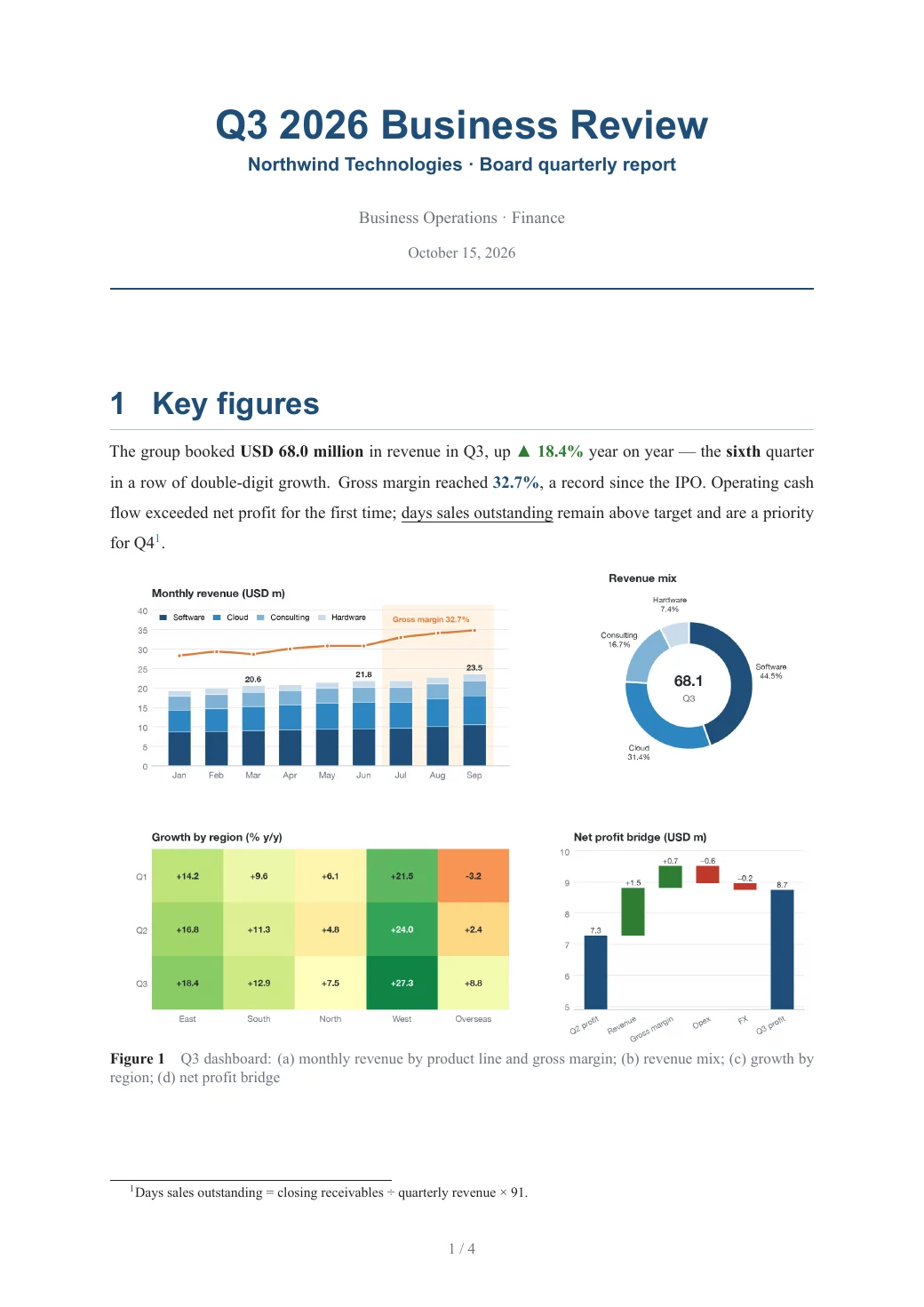
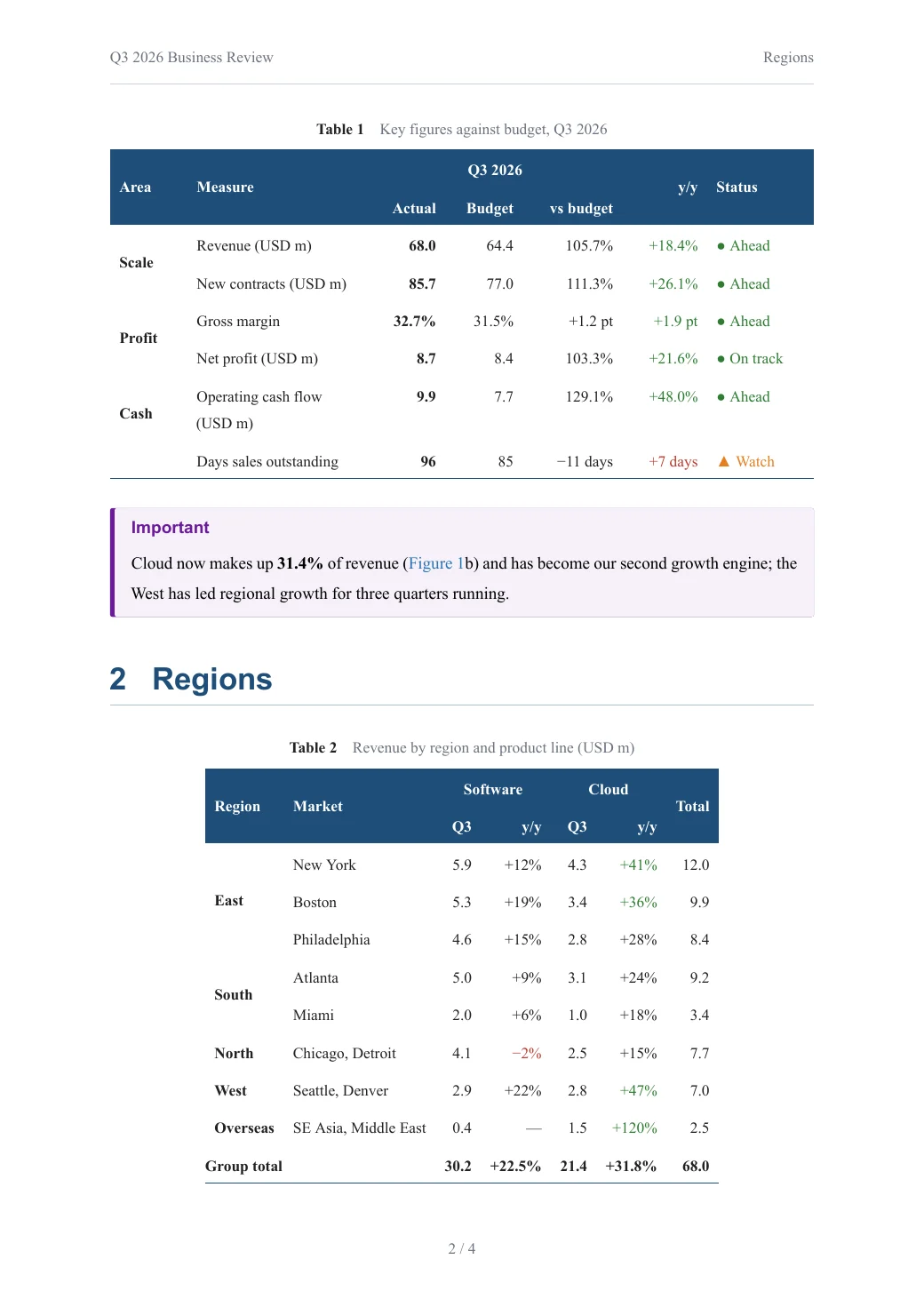
A four-panel dashboard, a KPI table with two-level headers, merged-cell regional breakdown, a DuPont formula, a colour-coded risk matrix and a task list — all in plain Markdown.
Open this PDF ↗Also delivered as an editable Word file
---
title: Attention-Weighted Physics-Informed Neural Networks for the Unsteady Navier–Stokes Equations
author: Ming Wang^1^, Hua Li^1,2^, Siyuan Chen^2^
date: September 2026
abstract: Physics-informed neural networks (PINNs) often fail to converge on unsteady flows at high Reynolds numbers because the gradients of their loss terms are badly out of balance. We propose Attn-PINN, which uses an attention mechanism to weight the residuals adaptively, and prove an upper bound on its approximation error. For flow past a cylinder ($\mathrm{Re}=3\,900$), Attn-PINN reaches a relative $L^2$ error of $1.7\times10^{-3}$ — **an order of magnitude** below the baseline — while training 41% faster.
bibliography: refs.bib
number-sections: true
header-left: Attn-PINN for the Unsteady Navier–Stokes Equations
---

# Introduction

PINNs embed the residual of a partial differential equation in the loss of a neural network [@raissi2019]. They need no mesh and solve forward and inverse problems alike, and have become a core method of scientific machine learning [@karniadakis2021]. For the strongly nonlinear Navier–Stokes equations, however, the gradients of the individual loss terms can differ by more than $10^{3}$, trapping training in a “gradient pathology” [@wang2021]. Neural operators [@li2021] ease the problem but need large amounts of labelled data. Borrowing the attention mechanism of the Transformer [@vaswani2017], we let the network **learn** the weight of every collocation point during training.

# Problem statement {#sec:problem}

Consider incompressible viscous flow in a domain $\Omega\subset\mathbb{R}^2$. The velocity $\mathbf{u}=(u,v)^{\top}$ and pressure $p$ satisfy

$$
\left\{
\begin{aligned}
\frac{\partial \mathbf{u}}{\partial t} + (\mathbf{u}\cdot\nabla)\mathbf{u}
  &= -\frac{1}{\rho}\nabla p + \nu\,\nabla^{2}\mathbf{u} + \mathbf{f},
  && (\mathbf{x},t)\in\Omega\times(0,T],\\
\nabla\cdot\mathbf{u} &= 0,
  && (\mathbf{x},t)\in\Omega\times(0,T],\\
\mathbf{u}(\mathbf{x},0) &= \mathbf{u}_0(\mathbf{x}),
  && \mathbf{x}\in\Omega,
\end{aligned}
\right.
$$ {#eq:ns}

where $\nu$ is the kinematic viscosity. With networks $\hat{\mathbf{u}}_{\theta}$ and $\hat{p}_{\theta}$ approximating the solution, the momentum residual is
$\mathbf{r}_{\theta} = \partial_t\hat{\mathbf{u}}_{\theta} + (\hat{\mathbf{u}}_{\theta}\cdot\nabla)\hat{\mathbf{u}}_{\theta} + \rho^{-1}\nabla\hat{p}_{\theta} - \nu\nabla^{2}\hat{\mathbf{u}}_{\theta} - \mathbf{f}$.

# Method {#sec:method}

## Attention-weighted residuals

For $N_r$ collocation points $\{\mathbf{x}_i\}$, the weights come from scaled dot-product attention over residual features:
…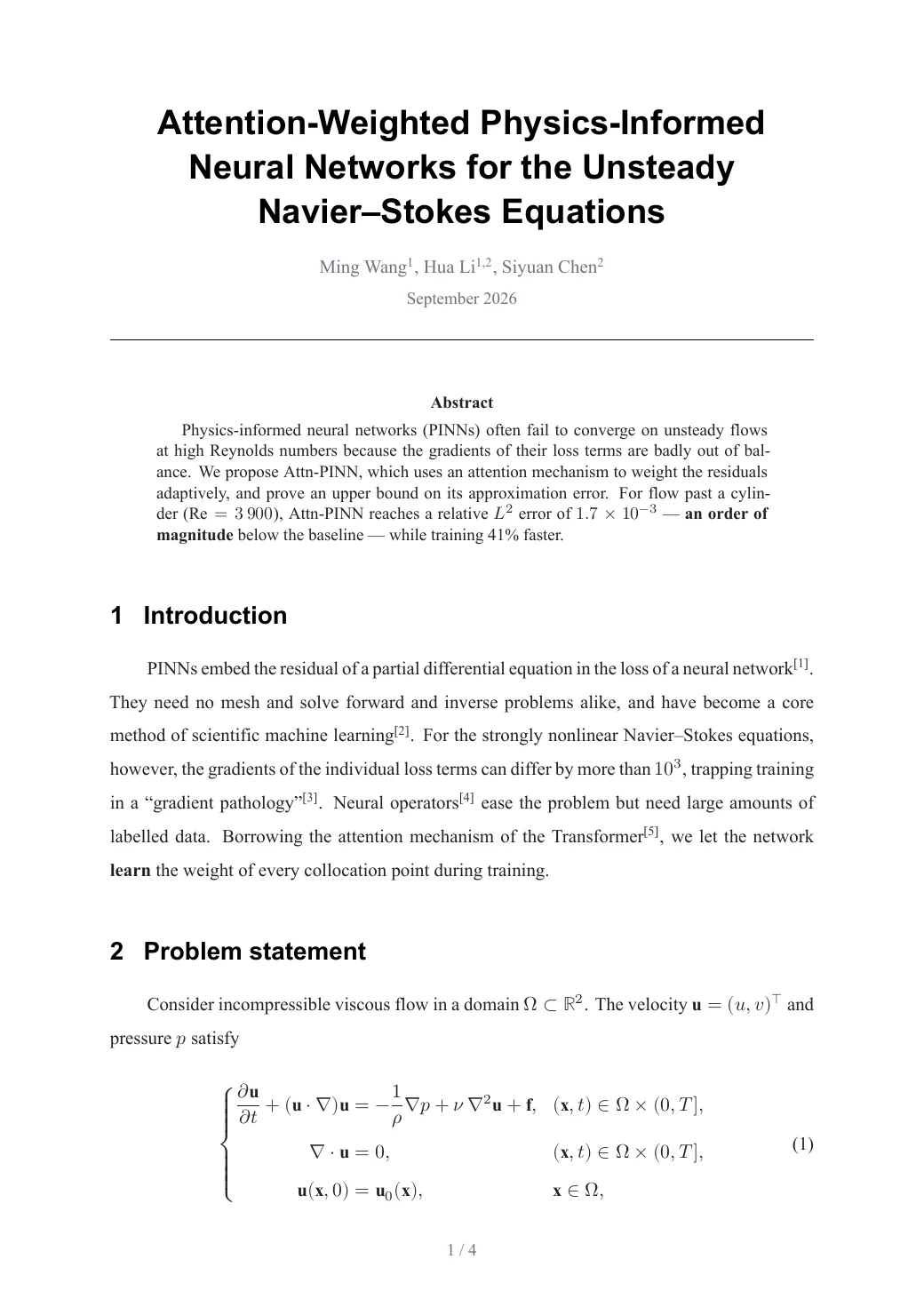
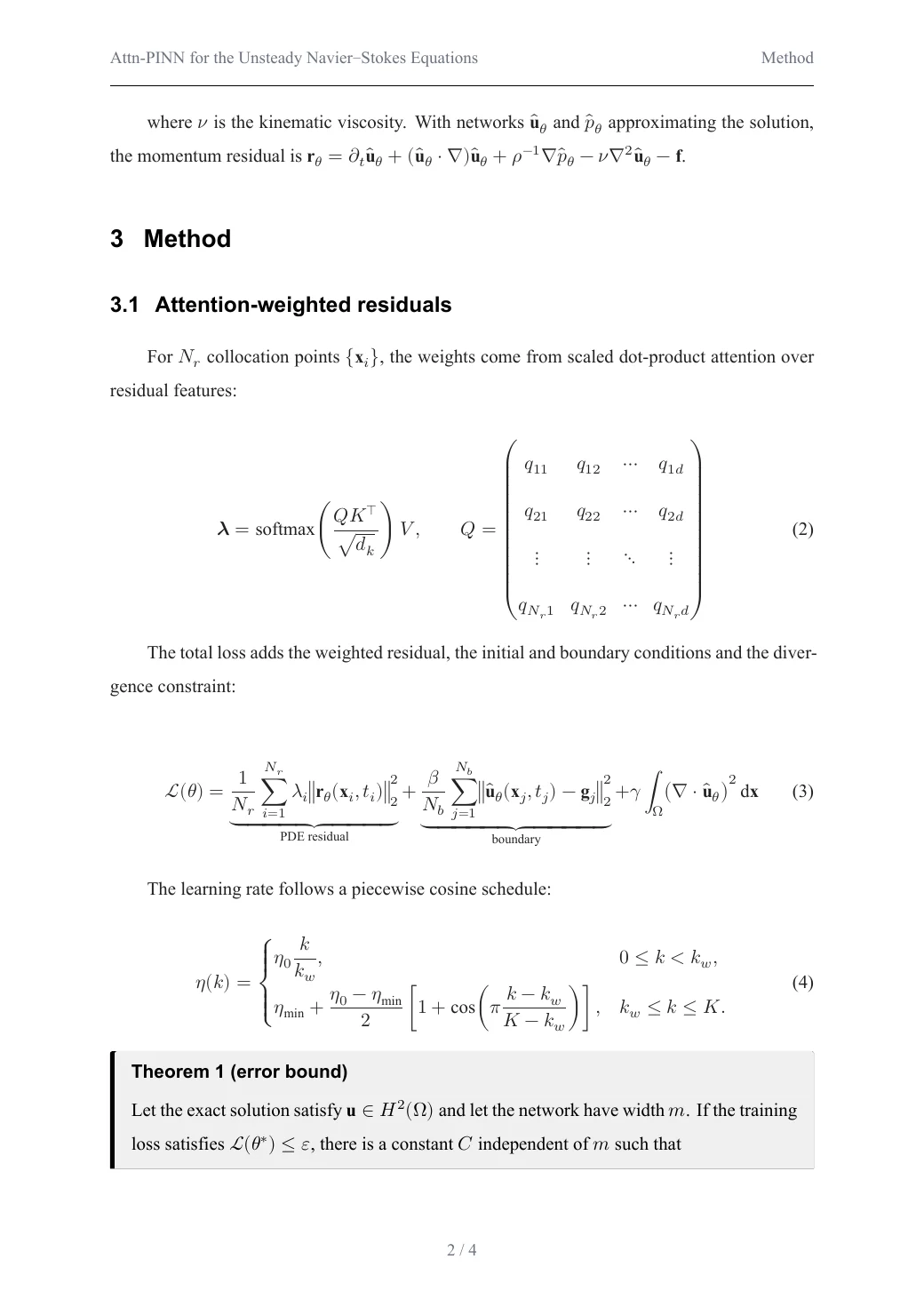
The Navier–Stokes system, matrices, piecewise functions, an annotated loss with underbraces, a theorem box, subfigures and a .bib bibliography — numbered and cross-referenced automatically.
Open this PDF ↗Also delivered as an editable Word file
Browse all examples, with PDF, Word and source to download →
Chinese without surprises
No missing glyphs or boxes: Chinese, Japanese and Korean text, punctuation and mixed Latin text are set properly.
Real tables
Long tables break across pages, wide tables fit the page, and merged cells (rowspan / colspan) work.
Equations and references
Numbered equations you can cross-reference, and a bibliography in GB/T 7714 style from a .bib file.
Long documents
Cover page, table of contents, page references (“see page 5”), appendices and landscape pages.
How it works
- 1
Add your document
Drop the .md file, its whole folder or a .zip, or paste the text. Missing images are listed before you convert.
- 2
Choose a style
Pick one of six styles. Options add a table of contents or heading numbers.
- 3
Download the PDF
Usually ready in seconds. Fonts are embedded, so it looks the same on every device.
Questions and answers
Why not just print to PDF from my editor?
Browser and editor exports often break Chinese text, split table rows badly and ignore page layout. Here the document is typeset for paper: proper margins, page numbers, captions and line breaking.
Can I use images from my computer?
Yes. Drop the whole folder (or a .zip) so the images keep their relative paths. Web images (https links) are fetched automatically.
Is there a page limit?
No fixed page limit. Each conversion may take up to 5 minutes; typical reports finish in under 20 seconds.
Can I get Word as well?
Yes — choose “PDF + Word” to get both from the same document.